
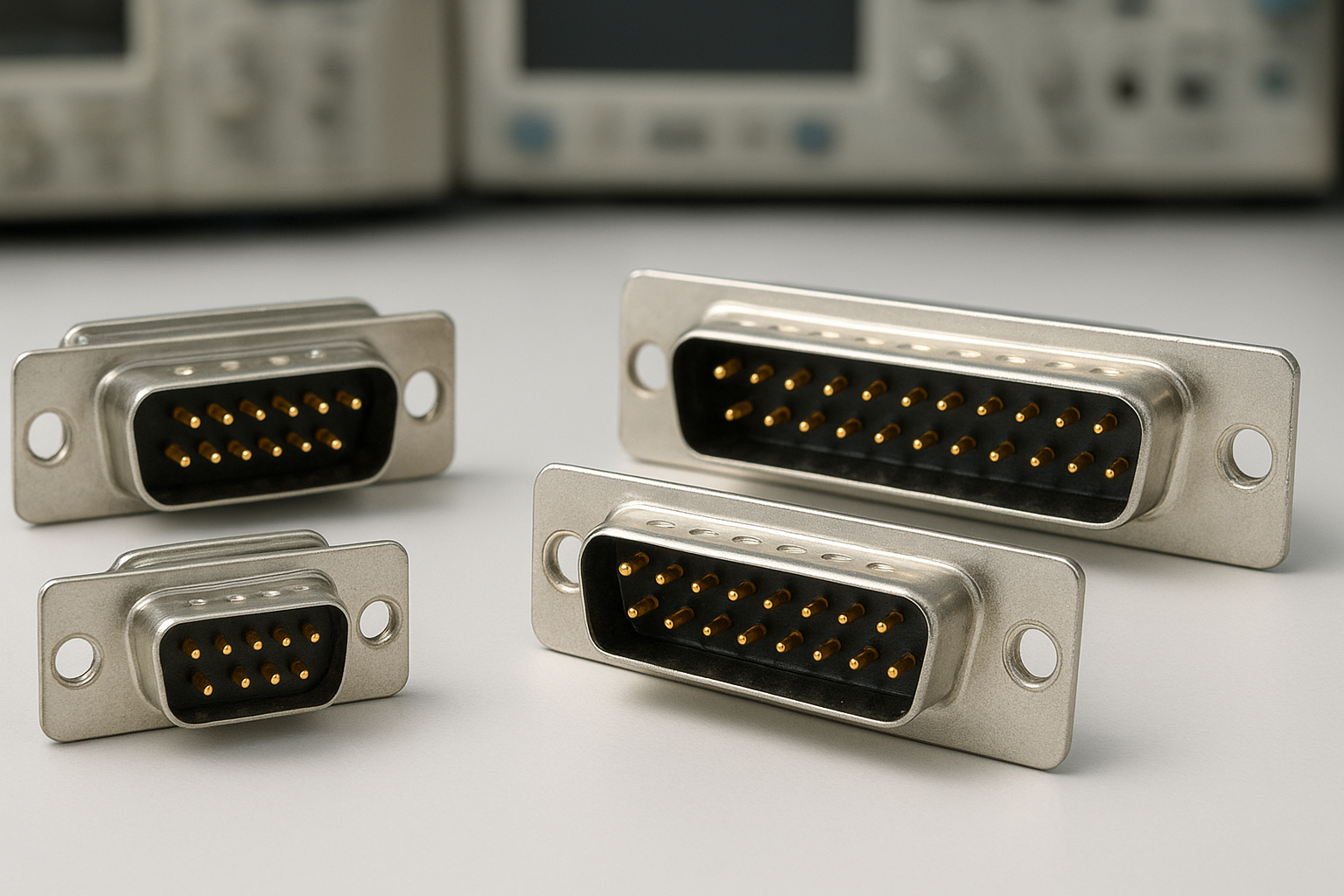

What is a D sub Connector?
The term D sub connector refers to a family of electrical connectors with a distinct D-shaped metal shield. Introduced in the 1950s, these connectors are prized for their reliability and ability to support multiple signal types, including analog, digital, and power. They remain a mainstay in industrial, computing, and consumer tech interfaces.
The D shape ensures proper alignment and prevents incorrect insertion. Inside the shell are rows of contacts or pins. D sub connectors come in a range of sizes, often defined by their maximum pin count, such as 9, 15, or 25 pins. Variations exist for high-density connections and specific mounting options.
A quick glance at many computer and audiovisual devices shows at least one D sub interface. Their tough metal housings make them stand out in environments that require both durability and frequent handling.
| Feature | Details |
|---|---|
| Full Name | D-subminiature (D sub) connector |
| Common Types | DB9, DB15, DB25, DB37, DB50 |
| Key Uses | Serial ports, monitors, data transfer, industrial automation |
| Main Characteristics | D-shaped shell, metal shield, multiple pins in rows |
| Locking Mechanism | Thumbscrews or slide locks |
Types of D sub Connectors
D sub connectors are classified by their pin counts and shell sizes. The label « DB » typically precedes the number of pins, though over time, additional letters (such as DA, DE) specified shell sizes and layouts. However, most users simply refer to DB9, DB15, DB25, and so on.
Each type finds its place in specific devices and systems. A quick glance at the back of vintage computers or AV equipment often reveals the type based on the port’s size and pin arrangement. Below are the most common varieties and their primary uses.
- DB9: 9 pins, often for serial (RS-232) communications.
- DB15: 15 pins, used for legacy game ports or certain video signals (VGA variants).
- DB25: 25 pins, popular in parallel/serial ports in PCs and printers.
- DB37 & DB50: Larger connectors for industrial and telecom equipment.
The main difference that stands out is the pin count and shell width, which determine compatibility. High-density versions pack even more pins in similar shells, adding flexibility to system designers.
Comparison Table: Common D sub Types
| Type | Pin Count | Typical Use |
|---|---|---|
| DB9 | 9 | Serial (RS-232), CNC machines |
| DB15 | 15 | Game ports, VGA graphics |
| DB25 | 25 | Parallel/serial, printers |
| DB37 | 37 | Industrial equipment |
| DB50 | 50 | SCSI, telecom, high-density I/O |
Physical Specifications and Pinouts
D sub connectors stand out due to their characteristic metal shell and pin layout. The standard shell sizes, labeled as DA, DB, DC, DD, and DE, correspond to various pin counts and connector widths. The two or more parallel rows of pins are arranged in a staggered fashion, optimizing both density and ease of alignment during connection.
The connector’s gender (male/female) refers to the pins versus sockets. Most computer ports are female, and the cables plug into them with male connectors. Metal shells not only guide connections but also provide strong EMI shielding, which is crucial in data-sensitive environments.
- Shell Sizes: DE (smallest, e.g., DE9), DB (classic, e.g., DB25), up to DD (largest).
- Pin Arrangements: Staggered in two (sometimes three) rows.
- EMI Protection: Provided by the continuous metal housing.
Wiring (pinout) diagrams are essential for correct matching—matching a DB9 serial’s pin 2 to pin 2, for example, is vital for device communication. Mistakes here lead to connection or device failures. Documentation and color codes help simplify wiring tasks for both professionals and enthusiasts.
Key Physical Specs
- Contact Material: Gold/metal-plated for durability
- Mounting: Panel, PCB, or cable-mounted
- Current Rating: Typically 5A or less per pin
- Locking: Thumb screws or spring clips for secure fit
Common Applications and Use Cases
Despite the emergence of USB and HDMI, D sub connectors still appear widely across devices. Their reliable electrical properties and strong locking mechanisms make them ideal in scenarios where vibration, physical movement, or environmental interference may impact signal quality.
Industrial automation and legacy computing are typical areas where D sub connectors excel. In these contexts, DB9s often support serial (COM) ports with programmable logic controllers (PLCs), while DB25s facilitate data transfer in office printers and instruments. Even VGA, a common analog video standard, uses the DE15 version for computer displays.
- Connecting serial (COM) ports on computers and routers
- Providing video output on monitors (VGA)
- Printer parallel ports in legacy offices
- Industrial equipment and robotics communication
- Instrumentation and data acquisition systems
While modern systems often use more compact connectors, D subminiature types remain popular in specialized hardware where durability and compatibility are critical.
Choosing the Right D sub Connector
Selecting the right D sub connector for a project is about matching technical specifications with application needs. The number of required pins is the obvious starting point—using a DB9 when only five connections are necessary makes wiring simpler and cost lower. However, environments with high electrical interference benefit from connectors with enhanced EMI shielding.
Another issue arises when space is at a premium. In these cases, high-density D sub connectors or alternatives like USB micro may be preferable. Make sure the mating hardware (cables, panels) matches both size and pin configuration to avoid accidental mismatches and costly rework.
- Check pin count and layout
- Verify shell size and mounting method
- Consider shielding and vibration resistance
- Confirm cable/port compatibility
- Choose reputable brands for longevity
The right choice ensures electrical safety, repeatable performance, and easier troubleshooting for years to come.
FAQ
- What does ‘D sub’ stand for?
- ‘D sub’ stands for D-subminiature, a connector type named for its D-shaped metal shell.
- Are D sub connectors still used today?
- Yes, especially in industrial, legacy IT, AV, and scientific applications where reliability and sturdy connections matter.
- What’s the difference between DE9 and DB9?
- Technically, DE9 is the correct term for the 9-pin version, but DB9 is widely used and accepted in industry circles.
- Can you adapt D sub connectors to USB?
- Adapters exist to convert signals, like RS-232 (via DB9) to USB, allowing legacy devices to connect with modern computers.
- Why choose D sub over newer connectors?
- D sub connectors offer better EMI protection, robust mechanical strength, and support for a large number of pins within a single shell.